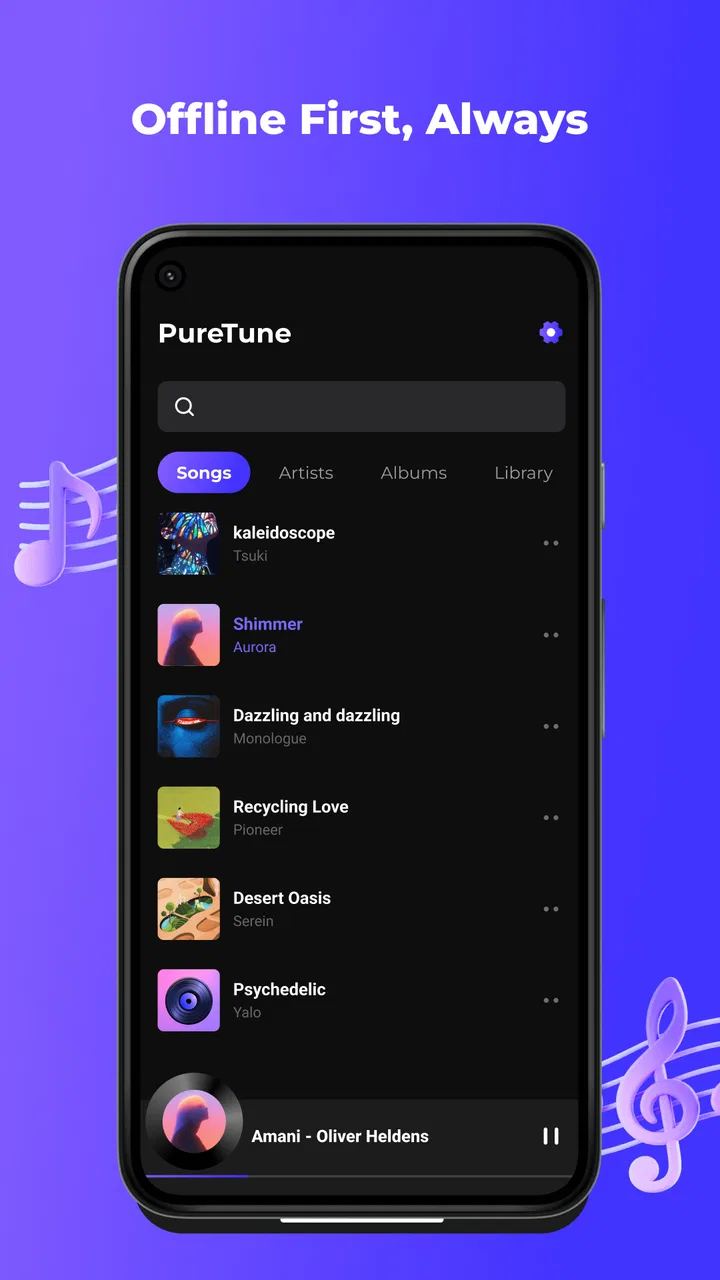
PureTune: Offline Music
- 4.2
- Rating
- 5.00M
- Installs
- Free
- Price

 Analysis by App-foxy
PureTune: Offline Music is the kind of Android audio app that makes a strong first impression by solving one very specific annoyance: wanting to listen without depending on a mobile connection. I tested it with that simple promise in mind, and I found the appeal easy to understand. It is free, aimed at everyone, and built around offline listening for moments such as travel, exercise, or any place where data access is unreliable. The important question, though, is not whether that idea sounds useful during the first few days. It is whether the app becomes a dependable part of a listening routine after the novelty wears off.
My answer is cautiously positive. The app from Flores feels most suitable for people who already have music available on their device and want a straightforward way to play it without streaming. It is less convincing for listeners who expect a complete discovery service, a large cloud catalog, or the social and recommendation features found in major streaming platforms. That distinction matters more than the attractive offline promise. PureTune is not trying to replace every music service; its lasting value depends on whether local playback is exactly what you need.
What PureTune feels like during the first week
The first-week appeal comes from removing a layer of uncertainty. With a normal streaming service, I am always thinking about signal strength, data usage, account access, or whether a playlist will load when I need it. An offline-focused player changes the routine: once the music is available locally, pressing play does not need to become a conversation with the network. That is especially practical on a flight, during a commute through poor coverage, or in a gym where I would rather keep my phone quiet and focused.
You May Also Like

 Blood Strike: 2.5 Anniversary
Blood Strike’s Loadouts Turn Every Drop Into a Tactical Gamble
A close look at Blood Strike’s custom loadouts: how fast access to signature weapons reshapes its battle royale rhythm, rewards preparation, and narrows the gap between fights.

 Pandora - Music & Podcasts
Pandora’s Music Is Easy to Start, but Harder to Recover
Pandora’s strength is its low-effort path from a seed to a station. Its weak spot is how much confidence it asks you to place in connection, setup, and quiet recovery.

 8 Ball Pool
 Is Built on Rivalries, Rematches, and Routine
A close look at the rivalries, rematches, shared routines, and unanswered safety questions that turn a quick pool match into a persistent mobile community.

 Samsung Music
’s Quiet Strength Is Playing What You Already Own
Its reach comes less from spectacle than from dependable access to a personal library. That simplicity is both the app’s strongest retention engine and its ceiling.

 AccuWeather: Weather Radar
AccuWeather Review: A Quick, Clear Forecast for Everyday Decisions
For everyday plans, the best forecast is the one you can understand quickly. AccuWeather makes rain timing, radar, and local conditions easy to act on, with a few trade-offs.

 Hill Climb Racing
Why Hill Climb Racing Still Turns Crashes Into One More Run
A tiny car, a bumpy hill and one more upgrade: Hill Climb Racing keeps resurfacing because its simple chaos makes every near-miss feel personal.
More From Our News Desk



I also like the psychological simplicity of the concept. PureTune is a music and audio app for local, offline listening, not an attempt to turn every listening session into a recommendation feed. That can be refreshing when I already know what I want to hear. A prepared album, workout selection, or collection of familiar tracks is often more useful than spending ten minutes browsing for something new.
The app is free, which lowers the barrier to trying it. Its audience rating is Everyone, so the basic positioning is broad rather than aimed at a specialist group. It requires Android 8.0 or later, making it accessible on many older phones as well as newer devices. I would still check the operating-system requirement before planning to use an older spare phone as a dedicated player, because compatibility is the first practical hurdle.
One useful way to approach the first launch is to treat it as a setup task rather than an instant streaming replacement. I would prepare the music before leaving home, test playback with mobile data turned off, and confirm that the tracks I care about are actually available locally. That small test is more valuable than assuming the word “offline” automatically covers every part of the listening experience. It also exposes whether the app fits the way I organize music.
A realistic travel and gym routine
Imagine a weekday morning when I am leaving for a long train journey. Before heading out, I select a few albums and a running playlist, then test them in airplane mode. On the train, I can start listening without repeatedly waiting for a connection. At the gym, the same preparation means I am not using exercise time to search, buffer, or troubleshoot. If I finish the session and still have battery left, I can continue listening on the way home without changing services.
That workflow highlights a strength that a short store description cannot show: offline playback is most valuable when it is prepared as a habit. The app does not create convenience by itself. It becomes convenient when I make a small pre-trip or pre-workout routine around it. For occasional users, that preparation may feel like extra work. For regular travelers, commuters, or people with limited data, it can become almost automatic.
PureTune is also a sensible option for a secondary phone. I can imagine using an older Android handset as a travel or workout device, keeping the main phone free for calls and navigation. The appeal is not that the app turns that phone into a full entertainment platform; it is that a simple local player can reduce distractions and avoid relying on a constant connection. That is a more specific use case than simply saying it is “good for travel.”
Where the first impression has limits
The same simplicity that makes the app approachable can make it feel narrow. If I expect the app to supply music, discover artists, synchronize a personal library across devices, or continue a cloud-based playlist wherever I go, I would probably be disappointed. PureTune should be judged as an offline player, not as a direct substitute for a full streaming subscription.
There is also a difference between owning or storing music and merely having access to it through another service. A streaming download may be available only inside that service, while a local player depends on audio that the device can use directly. Before committing to PureTune, I would think about where my listening library actually lives. If nearly everything I enjoy is tied to a streaming account, the app may not remove as much friction as I first expect.
The current version is 1.0.5, and that gives the app a relatively early-stage feel in my mind. I would not automatically treat that as a problem, but it does make long-term confidence depend on how consistently the app fits my existing files and routines. A newer player can be pleasant to use while still requiring a little patience during setup, especially for someone with a large or messy library.
Why the value can hold up from month to month
After the first few weeks, the novelty of “music without data” naturally fades. What remains is a practical question: does PureTune save enough effort often enough to deserve a permanent place on the phone? For me, the answer depends on frequency. If I travel regularly, exercise several times a week, or often spend time in areas with unstable reception, offline playback has recurring value. Every successful session avoids the same small problems again.
The app has reached more than a million installs and holds an average rating of 4.4 from around a thousand ratings. Those figures suggest that the basic idea is connecting with a substantial group of users, although they do not tell me whether every person uses it in the same way. I would read that reception as encouragement to try it, not as proof that it will suit a streaming-heavy listener.
Month-to-month usefulness is strongest when the listening pattern is predictable. A runner who repeatedly uses the same group of tracks does not need a fresh recommendation engine before every workout. A traveler who keeps a few reliable albums ready may value certainty more than novelty. Someone who listens casually at home, where a connection is always available, may notice far less benefit.
One of my favorite practical ideas is to create separate offline habits for different contexts. Instead of treating the whole library as one large collection, I would keep a compact travel selection, a workout selection, and perhaps a calm evening selection. That makes choosing something easier and reduces the maintenance burden. It also protects the app from becoming a cluttered drawer of forgotten tracks.
The trade-off between control and discovery
Traditional streaming apps are better when I want endless choice. They can help me find new artists, build mixes around a mood, and move from one device to another with little thought. PureTune is better when I want control over what is already on the phone and a listening session that does not depend on a service being reachable.
That trade-off becomes clearer over time. Streaming offers freshness but can encourage constant browsing. An offline player offers predictability but asks me to take responsibility for the collection. Neither side is automatically superior. I would choose PureTune for a deliberate library and a stable routine, while I would choose a streaming alternative for discovery, current releases, or a household where several people need shared access.
There is a useful middle ground too. I can use a streaming service for finding music and PureTune for the tracks I know I will replay. That arrangement makes the offline player a companion rather than a replacement. It is especially sensible for long journeys: discover and organize at home, then rely on the local player once the trip begins.
Who is likely to keep using it?
I think PureTune has the best chance of earning permanent space on the phone for four types of listeners. The first is the frequent traveler who wants a dependable selection without depending on train, airplane, or rural coverage. The second is the gym user who wants to start a workout quickly and avoid handling a phone unnecessarily. The third is the person managing mobile-data use carefully. The fourth is anyone who prefers a focused local collection over a large online catalog.
I would be more hesitant to recommend it as the main music app for someone who listens mostly to newly released music, depends on personalized recommendations, or expects seamless access across several devices. It may also be a poor fit for a person who does not want to organize or prepare audio locally. The app’s value rises as the user becomes comfortable with that responsibility.
Maintenance: the quiet cost of offline listening
The most important long-term issue is not pressing play; it is keeping the library useful. Offline music does not refresh itself in the same way a cloud catalog does. I need to decide what belongs on the phone, remove tracks I no longer want, and prepare selections before a trip. That is not a flaw unique to PureTune, but it is the central cost of choosing a local player over streaming.
I found that a small, intentional library is easier to maintain than a complete archive. Keeping every possible album available sounds convenient, but it makes selection slower and storage harder to manage. A focused collection also makes the app feel faster to use because I am not mentally sorting through years of forgotten choices. My advice is to begin with the music I replay most often, then expand only when a real need appears.
Another useful habit is to review the library before predictable events rather than waiting until the last minute. For a holiday, I would prepare travel music the day before. For regular workouts, I would keep a stable selection and replace only the tracks that have become tiring. This turns maintenance into a short recurring task instead of an emergency when I am already standing at a station or entering the gym.
That maintenance requirement is where PureTune may lose casual users. A person who wants music to appear instantly with no preparation may find a streaming service easier, even if it uses more data or requires a subscription. PureTune rewards planning. It does not remove the need to think about the library; it makes the payoff for that planning more reliable.
Small habits that improve the experience
I would keep the app’s role clearly defined. If I am using it for workouts, I would prepare a few different lengths of listening rather than one enormous queue. A short option helps when time is limited, while a longer one avoids repetition during an extended session. For travel, I would include a mixture of familiar albums and a few less-played choices so that the offline collection does not become stale too quickly.
I would also test the exact scenario that matters to me. Turning off mobile data is not the same as testing a full airplane-mode journey, so I would try playback with the phone disconnected before trusting it for an important trip. That is a concrete, low-effort check that can reveal whether my chosen music is ready and whether the workflow feels comfortable.
Finally, I would avoid judging the app by how exciting it feels on the first day. A local player earns its place through repeated, uneventful success. If I can open it every week and immediately find the music I prepared, that is more meaningful than a flashy first session. In this category, reliability and low friction matter more than novelty.
What may cause fatigue over time
The first source of fatigue is repetition. Offline collections can become predictable, especially when I use the same workout list or travel albums. A streaming service solves that with recommendations and constant access to new material. PureTune requires me to refresh the collection myself, so the app can feel less lively if I stop paying attention to what is stored locally.
The second is the separation between discovery and playback. If I hear a track elsewhere and want it immediately, the local-player workflow may involve finding it, making it available on the device, and organizing it before PureTune can become part of the routine. That delay is acceptable for planned listening but frustrating for spontaneous listening.
The third is library organization. A dedicated offline player is only as comfortable as the collection around it. Untidy naming, duplicate files, or an unclear folder structure can make a simple listening session feel like file management. I would not blame PureTune for every organizational problem, but I would recognize that the app exposes those problems more clearly than a polished streaming catalog does.
There is also a risk of using the app for the wrong job. If I expect it to replace a service built around subscriptions, synchronized libraries, and discovery, I will keep noticing what it does not provide. If I use it for the narrower task of dependable local listening, the same boundaries feel more reasonable. The right expectation is a major part of the long-term experience.
Its broad age rating and free price make experimentation easy, but those points do not eliminate the need for a personal fit. A free app can still cost time if I repeatedly prepare music and then return to another player. I would give it a fair trial through several real offline sessions rather than deciding after one quick launch.
My long-term verdict on PureTune
PureTune: Offline Music earns lasting space when I treat it as a practical tool, not a complete music ecosystem. Its strongest quality is clear: it supports listening in situations where connectivity, data, or distraction gets in the way. Travel and gym use are especially convincing because both benefit from a prepared, interruption-free selection. The free entry point and support for Android 8.0 or later make trying that workflow straightforward for many users.
Its limitations are equally clear. I have to maintain the music available on the device, accept less discovery than a streaming platform, and decide whether local playback fits the way I already access songs. The app is not my first recommendation for someone who wants an all-in-one catalog with effortless recommendations and multi-device continuity. In that situation, a conventional streaming alternative will probably feel more natural.
For the right listener, though, the recurring value is real. A dependable offline collection can become one of those quiet tools I appreciate most when I need it: ready for a commute, a workout, a flight, or a weak-signal day. The app’s rating of 4.4 and its user base of over a million installs show that this focused approach has broad appeal, but my recommendation is still based on the workflow rather than the popularity.
I would recommend trying it if you already keep music locally or are willing to build a small offline collection. Start with one travel or workout routine, test it without a connection, and see whether the preparation pays off repeatedly. If it does, PureTune can remain useful long after the initial novelty disappears. If you want music discovery to do all the work, skip it and stay with a service designed around streaming. For me, PureTune is worth keeping when reliability matters more than endless choice.
FAQs for PureTune: Offline Music
01What is PureTune: Offline Music?
PureTune: Offline Music is an app designed to enhance your music experience by allowing you to download and listen to your favorite tracks offline. It provides a seamless interface with multiple features like playlist creation, music categorization, and high-quality audio playback. It's perfect for users who want to enjoy music without internet connectivity.
02How do I download music for offline listening in PureTune?
To download music for offline listening, search for your desired track within the app. Once found, you can tap the download icon next to the track. The song will be saved to your device and accessible from the 'Offline Music' section, ensuring you can enjoy it without an internet connection.
03Is PureTune: Offline Music free to use?
PureTune offers both free and premium versions. The free version includes basic features with ads, while the premium version provides an ad-free experience with additional features like unlimited downloads and higher audio quality. The premium version typically requires a subscription fee.
04What audio formats are supported by PureTune?
PureTune supports a range of popular audio formats including MP3, AAC, and WAV. This ensures compatibility with most tracks you want to download and listen to. The app is designed to provide high-quality playback regardless of the format, making it versatile for various user needs.
05Can I create and share playlists in PureTune: Offline Music?
Yes, PureTune allows you to create, customize, and manage your playlists with ease. You can organize your music by genre, mood, or personal preference. Additionally, the app offers options to share your playlists with friends, making music discovery and sharing a social experience.
Pros
- Offline playback for uninterrupted listening.
- High-quality audio for an enhanced experience.
- User-friendly interface for easy navigation.
- Large music library with diverse genres.
- No ads for a seamless experience.
Cons
- Limited free features without subscription.
- No social features for sharing playlists.
- Occasional bugs in playlist management.
- Requires regular updates for new features.
- Lacks integration with some smart devices.

PureTune: Offline Music
Gallery